 Vyrazíme
Expense-splitting apps compared: Splitwise, Tricount, Splid, Settle Up and Vyrazíme
An expense-splitting app does one thing: everyone adds what they paid and it works out who sends how much to whom. It works for a holiday, a weekend at a cabin and a flat shared with flatmates.
Here are five apps side by side: Splitwise, Tricount, Splid, Settle Up and Vyrazíme. They differ in how finely they split a cost, what a friend needs in order to join and what they offer around the costs. For each one you can read who it suits, with a link to a detailed comparison.
Five apps side by side
| Splitwise | Tricount | Splid | Settle Up | Vyrazíme | |
|---|---|---|---|---|---|
| What it is for | Expenses on trips, at home and between friends | Expenses on trips, at home and as a couple | Settling up a holiday and shared living | Expenses on trips, between flatmates and couples | A whole event with friends, the costs are one part of it |
| How you split a cost | Equally, by exact amounts, percentages or shares | Equally, or with a custom share for each person | Equally or unequally, several payers | By weights, several payers, items from a receipt | Equally between everyone or between selected people |
| Foreign currencies | Over 100 currencies, converting to one currency is in paid Pro | Converted to the group's currency | Over 150 currencies with conversion | All currencies, you can overwrite the rate | Eight currencies, the rate fills in by itself |
| Without a connection | Offline mode | Add costs offline, they sync once you are back online | Offline in a local group | Works offline | Needs a connection |
| How a friend joins | By email, phone or link | You can try the app without signing up | No sign-up | By link, not everyone needs the app | By link, they fill in their name and email in the browser |
| How you settle up | In-app payment in the US and in selected European countries | A payment request you send from the app | A list of as few payments as possible | A list of as few transfers as possible | The account number to copy and a payment via Revolut |
| Where it runs | iPhone, Android and web | iPhone and Android | iPhone and Android | iPhone, Android and a web app | iPhone, Android and a browser on your computer |
| Price | Free up to 4 expenses a day, paid Pro | Free, no ads and no limits | Free, Excel export as an in-app purchase | Free, paid Premium without ads | Free, no ads |
| What surrounds the costs | Categories, spending totals, recurring expenses | Photos of receipts and spending overviews | The group's total spending, a PDF summary | Member statistics, CSV export | Date, place, accommodation, chat, rota, photos |
Who each one suits
Splitwise. It suits people who split expenses over the long term, for example rent with flatmates, and want to split a cost precisely. It splits equally, by exact amounts, by percentages and by shares, and it handles recurring expenses by weeks, months and years. It has an offline mode, over a hundred currencies and runs on iPhone, Android and the web. For free you can add up to four expenses a day. Unlimited expenses, converting currencies into one and receipt scanning belong to paid Splitwise Pro. In detail: Splitwise and Vyrazíme side by side.
Tricount. It suits people who want an app just for expenses, for free. It has no ads and no limit on expenses and you can try it without signing up. You set a custom share for each person on a cost, you add costs without a connection and a cost in a foreign currency is converted to the group's currency. You can attach a photo of the receipt to a cost and import your group from Splitwise. It runs on iPhone and Android. In detail: Tricount and Vyrazíme side by side.
Splid. It suits people who want to settle up without signing up. You keep the settle-up yourself on your phone, even without a connection, or you share the group online and add costs together. It handles unequal splits, several payers on one expense and over 150 currencies with automatic conversion. You save the summary as a PDF, Excel export is an in-app purchase. In detail: Splid and Vyrazíme side by side.
Settle Up. It suits people who want to settle up as they go and need a more complex split. It shows who should pay next and handles splitting by weights, several payers on one expense and items from a receipt. You set how many times a member counts, so a couple or a family acts as one member. It runs on the phone and as a web app and works offline. An ad-free app, photos of receipts, categories and recurring payments are in paid Premium. In detail: Settle Up and Vyrazíme side by side.
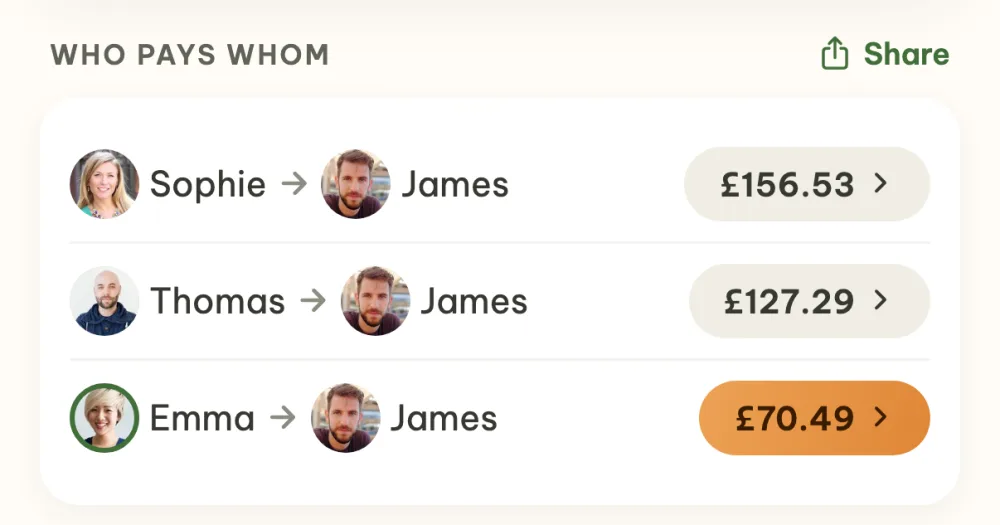
Vyrazíme. It suits people who are settling up a trip, a weekend or a holiday with friends and want the costs inside the event where they agreed the date, the place and the accommodation beforehand. Everyone adds what they paid and the app works out the shortest list of payments. On each payment it shows the account number to copy and a payment via Revolut. A family has one row in the settle-up. It is free and has no ads. The split is simpler than in the other four: a cost has one payer and is split equally between everyone or between selected people. There are eight currencies and you need a connection to add a cost. The full walkthrough is in the guide How to split holiday costs with friends.
Splitwise or Tricount?
Both apps do the same thing: everyone adds what they paid and the app works out who pays back how much to whom. They differ in what you get for free and how finely you split.
- The free limit. Free Splitwise lets you add up to four expenses a day. Tricount has no limit and no ads.
- Splitting. Splitwise also splits by percentages and exact amounts. Tricount has custom shares on a cost.
- Currencies. Splitwise keeps each currency separately and converting to one is in paid Pro. Tricount converts a cost to the group's currency.
- Signing up. You can try Tricount without signing up.
- Where it runs. Splitwise also has a web version. Tricount lists iPhone and Android.
- Long-term expenses. Splitwise handles recurring expenses.
If you add more than four expenses a day on holiday and want a free app, Tricount suits you. If you split rent and bills in a flat and need percentages and recurring expenses, Splitwise suits you.
How to choose
- You split rent and bills with flatmates: Splitwise.
- You want an app just for expenses, free and without ads: Tricount.
- You want to settle up without signing up and keep the settle-up for everyone yourself: Splid.
- You need weights, several payers or items from a receipt: Settle Up.
- You add costs without a connection: Splitwise, Tricount, Splid or Settle Up.
- You are settling up a trip with friends and want to send the money via Revolut or to an account: Vyrazíme.
- Besides the costs you will be choosing the date, the place and the accommodation: Vyrazíme.
FAQ
Which expense-splitting app is free?
Tricount says it is free, with no ads and no limits. Splid is free and sells Excel export as an in-app purchase. Free Splitwise allows four expenses a day, unlimited expenses are in paid Pro. Settle Up is free and has the ad-free app in paid Premium. Vyrazíme is free and has no ads.
Which app works without signing up?
Splid works without signing up and you can try Tricount without signing up. In Vyrazíme your friend fills in their name and email in the browser and doesn't have to install the app.
Can Vyrazíme split a cost by percentages or shares?
No. A cost has one payer and is split equally between everyone or between selected people. For percentages and exact amounts Splitwise is the one built for it, for weights and several payers Settle Up and Splid.
Can you move from Splitwise to Tricount?
Tricount lists importing a group from Splitwise, so you don't have to retype a group you have already started.
We checked the details about Splitwise, Tricount, Splid and Settle Up on 11 November 2026 on their websites, in their help centres and in the App Store.