 Vyrazíme
Splitwise alternative for trips and events with friends
Splitwise is an app for splitting shared expenses. You add who paid for what and it keeps track of who owes how much to whom. It works for trips as well as for flatmates who share bills all year round.
On a trip with friends the costs are one part of the whole event. Before them come the date, the place and the accommodation, after them the photos. Vyrazíme keeps all of that in one event. Everyone adds costs as often as they need and you settle up via Revolut or to a bank account. It is free and your friends join through a link.

Splitwise and Vyrazíme side by side
| Splitwise free | Vyrazíme | |
|---|---|---|
| What it is for | Shared expenses on trips, at home and between friends | Trips, weekends and celebrations with friends |
| How many costs you can add | Up to 4 a day | As many as you need |
| How you split a cost | Equally, by exact amounts, percentages or shares | Equally between everyone or between selected people |
| Foreign currencies | Over 100 currencies, each with its own balance. Converting to one currency is in paid Pro | Eight currencies, the rate fills in by itself and the balance is in one currency |
| Who pays whom | Simplifies debts into as few payments as possible | The shortest list of payments |
| How you settle up | In-app payment in the US and in selected European countries, elsewhere you pay outside the app and record it | The account number to copy and a payment via Revolut |
| Families | Shares on a cost, a default split for the group is in Pro | A family has one row and the money goes to its representative's account |
| Ads | Ad-free is paid Pro | None |
| How a friend joins | By email, phone or link, they see their balance after signing in | By link, they fill in their name and email in the browser |
| What surrounds the costs | Expense categories and spending totals | Date, place, accommodation, chat, rota, photos |
| Price | Free with limits, paid Splitwise Pro | Free |
Where they differ
What you get for free. Free Splitwise lets you add up to four expenses a day. Unlimited expenses, currency conversion, receipt scanning and an ad-free app belong to paid Splitwise Pro. In Vyrazíme anyone in the event adds a cost as often as they need, ideally straight after paying. The whole settle-up is free and without ads.
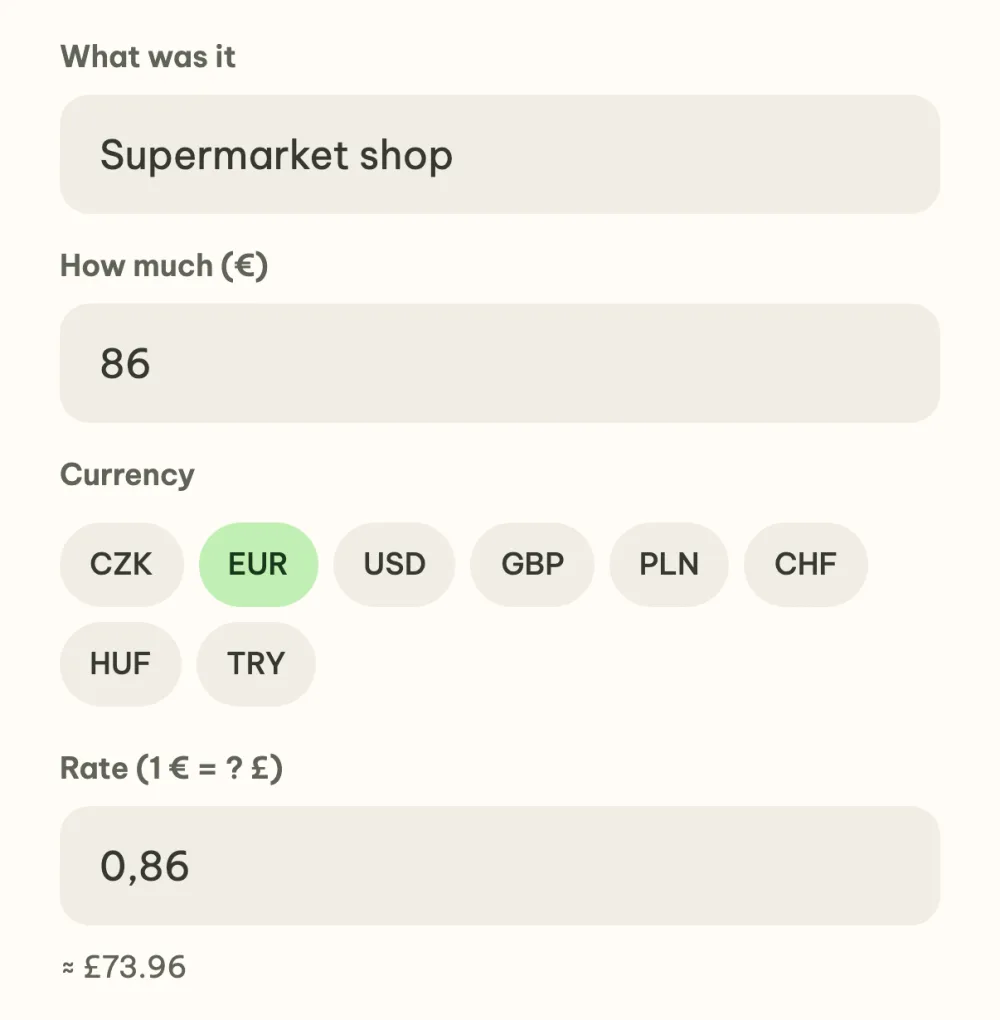
Foreign currencies. Splitwise keeps each currency separately, so after a holiday you can owe in one currency and be owed in another. Converting everything to one currency is in paid Pro. In Vyrazíme you choose the currency on the cost, the Czech National Bank rate fills in by itself and is fixed once saved. You then see the balance and the payments in one currency.
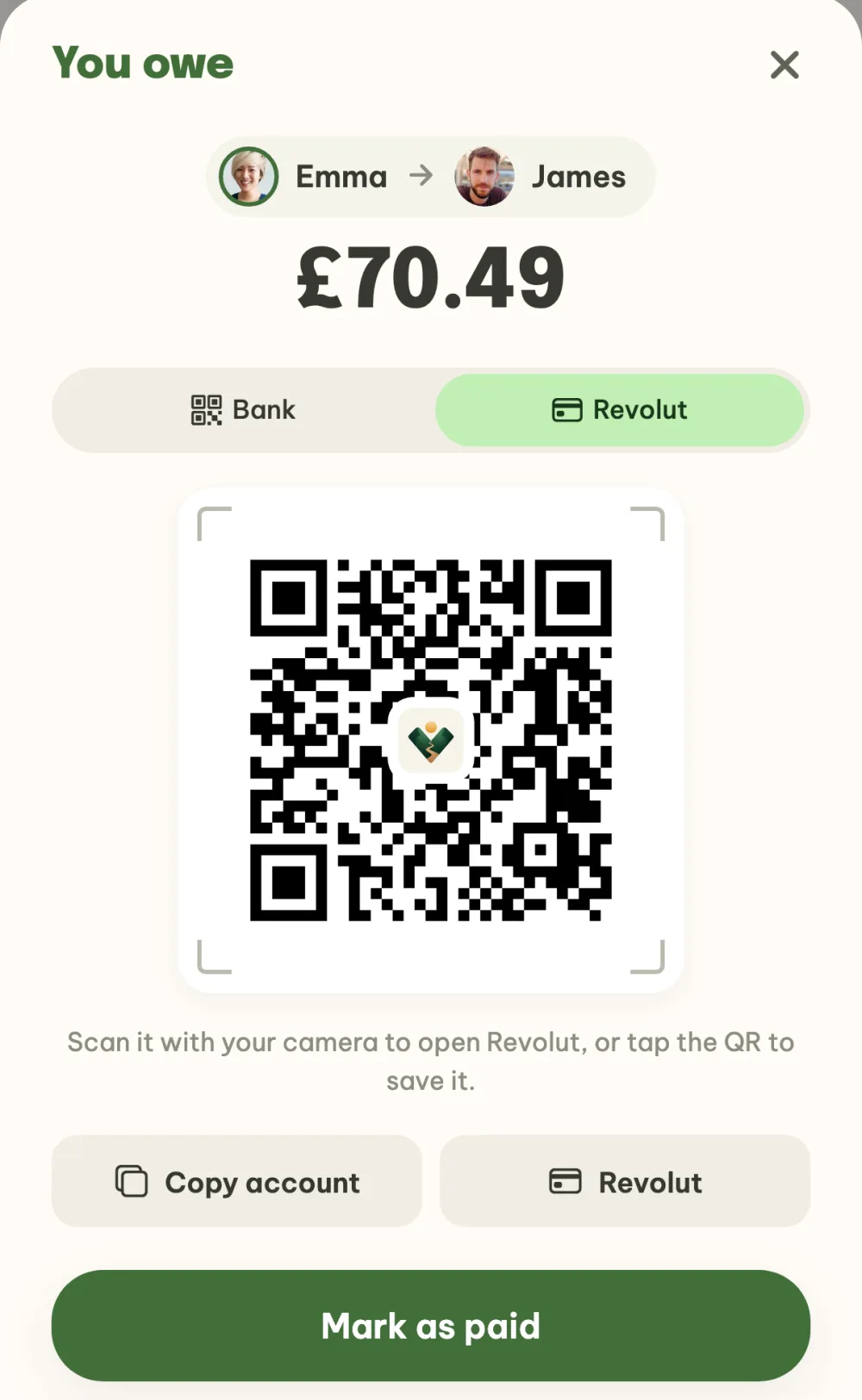
How you send the money. Splitwise can pay straight from the app in the US through Splitwise Pay, Venmo and PayPal, and in selected European countries through a Pay by Bank transfer. Where these options aren't available, you send the money outside the app and record the payment in it. Vyrazíme shows the account number to copy and a payment via Revolut on each payment, with a QR code that opens Revolut when you scan it with your camera. Once you have paid, you mark it as paid.
Families. In Splitwise a family is handled with shares: whoever pays for two gets two shares on the cost. A default split for the whole group is in Pro. In Vyrazíme you set up a family once. It has one row in the costs and the money for it goes to its representative's account.
What surrounds the costs. Splitwise looks after expenses and adds categories and spending totals. In Vyrazíme the costs are one card of the event. In the same event you first vote on the date, the place and the accommodation, you sort out the rest in the chat, and once you are back the photos come together in the album.
When to stay with Splitwise
- You split expenses over the long term, for example rent with flatmates. Splitwise handles recurring expenses by the week, month and year.
- You need to split by percentages, shares or exact amounts. Vyrazíme splits equally between everyone or between selected people.
- You pay in a currency Vyrazíme doesn't have. Splitwise offers over a hundred.
- You add costs without a connection. Splitwise has an offline mode.
- You want to export the expenses to a spreadsheet.
- You are in the US and want to pay through Venmo or PayPal straight from the app.
When to reach for Vyrazíme
- You are settling up a trip, a weekend or a holiday and everyone adds what they paid.
- You want to send each other the money via Revolut or to an account, with the number ready to copy.
- Several families are going and each wants one row in the settle-up.
- Before settling up you will be choosing the date, the place and the accommodation.
How to get started with costs
- Create an event and send your friends the link.
- Add the costs. Whoever pays taps the plus and fills in what it was and how much.
- Settle up. In the Who pays whom section tap your payment and send the money via Revolut or to the account.
The full walkthrough with pictures is in the guide How to split holiday costs with friends.
FAQ
Is Vyrazíme really free?
Yes, the whole planning is free, with no subscription and no ads. Only two things are limited: the AI features to five uses a day and the album to 100 photos.
Do my friends need the app?
No. The event link opens in the browser at vyrazime.app, your friend fills in their name and email and is in the event. If they have the app, the link opens straight in it.
Can Vyrazíme split a cost by percentages or shares?
No. A cost is split equally between everyone or between selected people, and you can set for the event whether children count too. For percentages, shares and exact amounts Splitwise is better built.
Can I pay by scanning a QR code?
Yes, with Revolut: the QR code in the settlement window opens the payment in Revolut when you scan it with your camera. The QR code for a banking app is read reliably only by Czech banks in crowns, so for a bank transfer copy the account number.
Which languages is Vyrazíme in?
Czech, English, German and Spanish. Splitwise lists twelve languages in the App Store, with English, German and Spanish among them.
We checked the details about Splitwise on 11 November 2026 in its help centre, on its website and in the App Store.